1. IL-2
1.1 The DirectInput Tap
Both IL-2 titles compute their own force feedback: dynamic stick forces and shake effects. The DirectInput Tap captures those effects and renders them through TelemFFB, where each effect type gets an enable toggle and a gain, and the game’s spring gets per-axis corrections. To render the captured spring, select the Game Managed (DirectInput Tap) joystick spring mode.
1.1.1 FFB Pedals in IL-2 Korea
IL-2 Korea is the only supported simulator that renders force feedback to pedals. With the tap capturing the pedals, set Pedal Spring Mode on the pedals instance to Game Managed (DirectInput Tap), and TelemFFB renders the game’s own pedal forces. Only IL-2 Korea’s pedal list offers this mode, because IL-2 Great Battles has no pedal force feedback.
1.2 FFB Telemetry Spring Mode (IL-2 Korea)
IL-2 Korea also sends its spring commands in its telemetry. The FFB Telemetry (Game Managed) spring mode renders the game’s spring from that data, without the DirectInput Tap. TelemFFB follows the spring’s center and strength as the game sets them. The mode is offered in IL-2 Korea’s Joystick Spring Mode and Pedal Spring Mode lists.
The mode needs two things in System Settings:
- IL-2 Korea must send its FFB telemetry. Auto Telemetry setup configures this for you. The game sends this data only while its own force feedback is turned on.
- The IL-2 Korea IL-2 Install Path must be set. TelemFFB reads the game’s list of input devices from that folder to find the spring commands meant for your device.
The Monitor tab shows the values the game sends: FFB_X_Center and FFB_X_Force for the X axis, and FFB_Y_Center and FFB_Y_Force for the Y axis.
1.3 Duplicate ‘Shake’ Effects
IL2 implements FFB for dynamic stick forces and some very basic shake effects. TelemFFB implements duplicate (but far more configurable) effects which overlap with those that are implemented by IL2. To enable these specific settings, enable the “IL-2 Shake Master” setting in TelemFFB.
Note
It is recommended to set the “Shaking” intensity in the IL-2 FFB control settings to 0 if you enable these settings in TelemFFB.
This can be found in Settings→Input Devices within the IL2 configuration
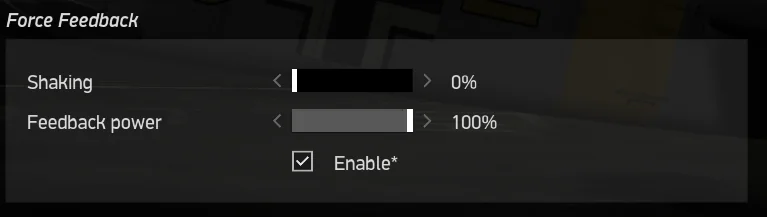
The IL2 Shake Master settings
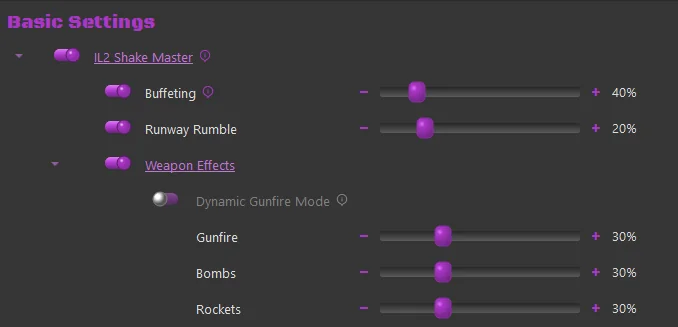
Each setting individually controls the intensity of that effect type:
-
Buffeting - Controls the intensity of AoA Stall Buffeting
-
Runway Rumble - Controls the intensity of bumping induced while taxiing
-
Weapons Effects (Master Toggle)
-
Dynamic Gunfire Mode
-
When Enabled, the shell size and weight are used to calculate a dynamic effect frequency. In general, smaller lighter rounds will produce a higher frequency effect than larger, slower rounds.
- Direct “rounds per second” telemetry is not available from the sim
-
-
Gunfire - Controls the intensity of the gunfire/canon effect
- Bombs - Controls the intensity of the bomb-drop effect
- Rockets - Controls the intensity of the rocket firing effect
-