Effects driven by acceleration telemetry, in the order they appear under the Inertial section of the Settings tab. The badge lines and sub-setting tables are generated from the application’s settings catalog, so they always match the app.
Simulates the increasing pull force required on the stick as g-loading builds in a dive pull-out or hard turn. The force is a percentage of the constant-force value in VPforce Configurator. The mode dropdown offers these options, each with its own sub-settings:
Disabled - no G-force effect.
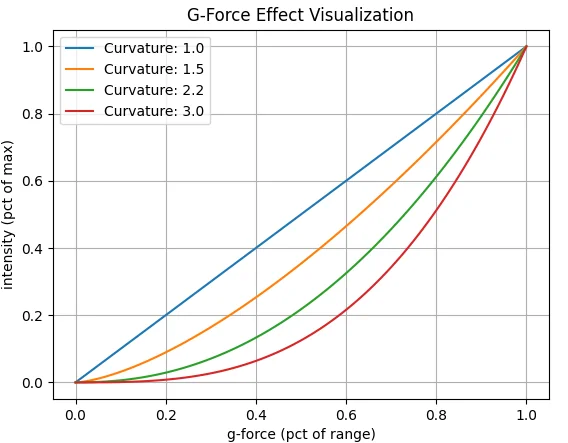
Exponential Curve - force ramps between Minimum Gs and Maximum Gs, shaped by the G Force Curvature: 1.0 is linear across the g range; higher values flatten the onset and steepen the force toward the top.
Example curvature values and the resulting force curves
- Linear + Deflection Based - a force is calculated from the current g-loading between the start and maximum G settings, and the physical stick deflection determines how much of it applies. Example: g-loading halfway between min and max gives a 50% calculated force; with the stick pulled back 50%, the output is 0.5 × 0.5 = 25%. As you pull harder, both factors rise. The Y-Axis Max Point sets the deflection at which 100% of the calculated force applies, and Enable Negative Gs extends the effect to negative g.
- Custom Curve - maps g-loading to force through a visual curve editor, with separate positive and negative curves, applied either as a constant force or as a spring center offset; see Advanced Spring & G-Force Curves.
In mode: Exponential Curve
Sub-setting
Sims
What it does
Max Intensity
—
Max force to apply during effect (% of VPf Conf ‘constant’)
G Force Curvature
—
Affects the onset characteristics of the overall effect
Minimum Gs
—
G loading where effect will start
Maximum Gs
—
G loading where effect will max out
In mode: Linear + Deflection Based
Sub-setting
Sims
What it does
Maximum Intensity
—
Max force to apply during effect (% of VPf Conf ‘constant’)
Start Gs
—
G loading where effect will start
Maximum Gs
—
G loading where effect will max out
Y-Axis Max Point
—
Y Axis deflection that will result in %100 of calculated force based on current g loading and min/max settings
Enable Negative Gs
—
Enable effect for negative Gs
↳ Maximum Intensity (Neg)
—
Max force to apply during effect (% of VPf Conf ‘constant’)
↳ Start Gs (Neg)
—
G loading where effect will start
↳ Maximum Gs (Neg)
—
G loading where effect will max out
↳ Y-Axis Max Point (Neg)
—
Y Axis deflection that will result in %100 of calculated force based on current g loading and min/max settings
Monitors deceleration g-forces and, while the aircraft is on the ground, pushes the stick forward (away from the pilot) proportionally to the deceleration; braking you can feel. Capped at Deceleration Max Force, scalable, invertible, and restrictable to ground operations.
Sub-setting
Sims
What it does
Deceleration Max Force
DCS, IL2, IL2 Korea, MSFS, XP
Deceleration effect pulls the stick forward when on the ground and decelerating
Deceleration Scale Factor
DCS, IL2, IL2 Korea, MSFS, XP
Artificially increase the G forces in the direction of deceleration
Invert Force
DCS, IL2, IL2 Korea, MSFS, XP
Invert the frame of reference (direction of force) for the effect. I.e. stick moving away from pilot vs. pilot moving towards stick.
Simulates the lateral acceleration felt in uncoordinated flight: slip or skid pushes the stick sideways, the way your body would lean in the real aircraft.